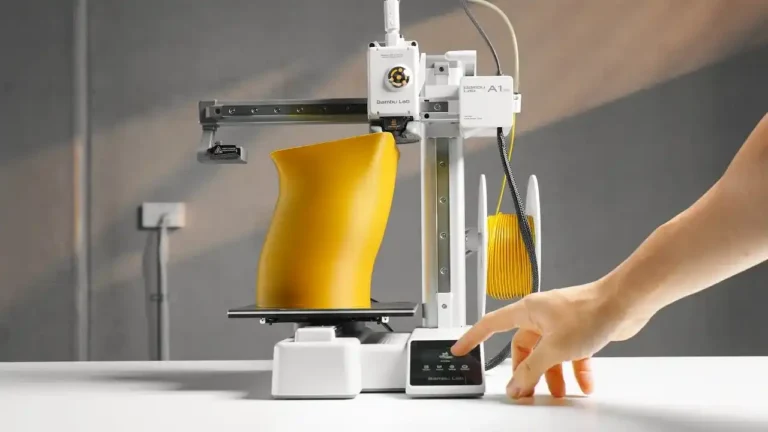
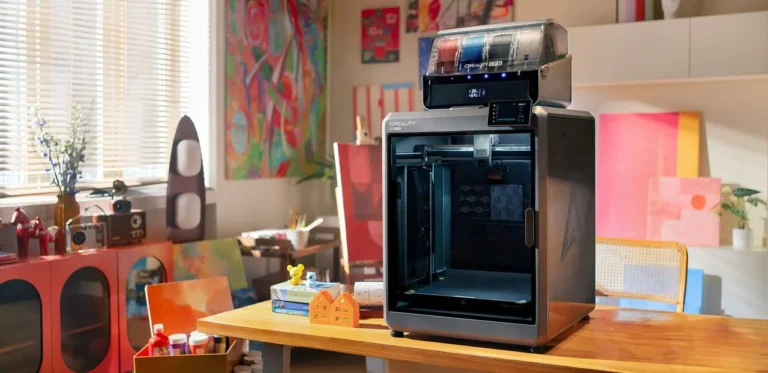
How long does a 3D printer last, In the rapidly evolving landscape of 2026, 3D printers have shifted from experimental gadgets to essential production tools. Whether you are running a high-speed Bambu Lab A1, a rugged Creality K1C, or a massive Anycubic Kobra 4 Max, your printer is an asset with a finite lifespan. For anyone using the pea3d.com cost calculator, understanding the life expectancy of your machine is vital for calculating accurate depreciation and ensuring long-term profitability.
But the question remains: What is the lifespan of a 3D printer in 2026? The answer isn’t a single number but a combination of mechanical wear, technological obsolescence, and maintenance discipline. In this 1,200+ word guide, we will break down the life expectancy of modern 3D printers and how to extend it.
1. Defining “Lifespan” in the 3D Printing World
When we talk about how long a printer lasts, we must distinguish between two types of longevity:
Mechanical Lifespan
This refers to the physical components. Motors, bearings, and rails eventually wear out. In 2026, a well-maintained consumer-grade printer typically has a mechanical lifespan of 5,000 to 10,000 printing hours. Professional-grade machines can often exceed 15,000 hours before requiring a total overhaul.
Technological Lifespan (Obsolescence)
In a world where speeds have jumped from 50mm/s to 600mm/s in just a few years, a printer might “work” perfectly but be technologically obsolete. By 2026 standards, a printer’s technological relevance usually lasts 3 to 5 years before newer AI-driven features and faster motion systems make older models economically unviable for business use.
2. The Core Components: What Fails and When?
To accurately calculate your machine’s hourly cost on pea3d.com, you need to know which parts are “consumables” and which are “structural.”
Consumables (Lifespan: 100 – 1,000 Hours)
- Nozzles: Brass nozzles last about 200–400 hours with standard PLA. Hardened steel nozzles, standard on the Creality K1C, can last over 1,000 hours, even with abrasive carbon fiber.
- Build Plates: PEI sheets eventually lose their stickiness. Depending on the materials used, expect to replace them every 6–12 months of heavy use.
- PTFE Tubing: In Bowden setups, the tube degrades near the hotend, especially at high temperatures. It should be checked every 500 hours.
Moving Parts (Lifespan: 2,000 – 5,000 Hours)
- Belts: High-speed printing puts immense strain on belts. On machines like the Bambu Lab P2S, belts are reinforced, but they still stretch or fray. Expect replacement every 3,000 hours.
- Fans: These are often the first “mechanical” failure. Cooling fans run at 100% for hundreds of hours and usually fail between 2,000 and 4,000 hours.
- V-Slot Wheels vs. Linear Rails: Old-school rubber wheels (found on older Ender models) wear out in 1,000 hours. Modern linear rails (standard in 2026) can easily last 5,000+ hours if lubricated.
Major Components (Lifespan: 8,000+ Hours)
- Stepper Motors: These are incredibly resilient. Unless they are overheated consistently, they can last over 10,000 hours.
- Motherboards: Electronic failure is rare but usually happens due to poor ventilation or power surges.
3. Brand-Specific Longevity: Bambu Lab, Creality, and Beyond
Not all printers are built the same. Here is how the top brands of 2026 stack up in terms of durability:
Bambu Lab (A1 / P2 Series)
Bambu Lab machines are built like precision appliances. The A1 is designed for high-cycle reliability. However, because many parts are proprietary, “end of life” often comes when the manufacturer stops supporting the specific hardware revision.
- Expected Business Life: 3–4 years of heavy use.
Creality (K1C / Ender-3 V3 KE)
Creality has moved toward “industrial-lite” builds. The K1C uses high-grade components specifically designed for abrasive filaments. Because Creality is open-source friendly, you can replace almost every part with third-party alternatives, indefinitely extending its mechanical life.
- Expected Business Life: 5+ years (with parts replacement).
Anycubic & Elegoo (Kobra / Neptune Series)
These brands offer incredible value but often use slightly lower-spec fans and bearings to keep costs down. They are excellent workhorses, but they require more frequent “preventative maintenance” to reach the 5,000-hour mark.
- Expected Business Life: 2–3 years before a major overhaul is needed.
4. How to Calculate Depreciation for pea3d.com
To use the pea3d.com cost calculator effectively, you must enter a “Machine Hourly Cost.” Here is the formula professionals use:
$$\text{Hourly Cost} = \frac{\text{Purchase Price} + \text{Estimated Maintenance Costs}}{\text{Target Service Hours}}$$
Example:
- You buy a printer for $600.
- You estimate $200 in nozzles, belts, and fans over its life.
- You want it to last 4,000 hours.
- Total: $800 / 4,000 = $0.20 per hour.
If you don’t include this $0.20 in your price, you are essentially “eating” your printer’s value with every job.
5. 7 Pro Tips to Double Your Printer’s Life
In 2026, maintenance is easier thanks to AI sensors, but manual care is still king.
- Lubrication is Life: Linear rails and lead screws should be cleaned and lubricated every 200–300 hours. Use high-quality synthetic grease.
- Check Belt Tension: Over-tightened belts destroy motor bearings; loose belts ruin prints. Use a tension meter or the printer’s built-in AI calibration.
- Cool the Electronics: Ensure the motherboard fan is free of dust. Heat is the #1 killer of 3D printer brains.
- Stable Power: Use a high-quality surge protector or a UPS (Uninterruptible Power Supply). Power flickers in 2026 can still fry sensitive AI chips.
- Clean Your Bed: Oils from your skin degrade the PEI surface. Wash with warm soapy water, not just IPA, to remove sugar-based residues from PLA.
- Slow Down for Non-Critical Parts: Just because your Bambu Lab can print at 600mm/s doesn’t mean it should for everything. Reducing speed by 20% can reduce mechanical wear by 50%.
- Filament Storage: Wet filament causes “popping” in the hotend, which creates backpressure and wears out your extruder gears faster. Use a dry box.
6. When is it Time to Retire Your Printer?
There comes a point where the cost of repair exceeds the value of the machine.
- The “Rule of 50%”: If a single repair costs more than 50% of a new, faster, more efficient machine, it’s time to retire the old unit.
- Energy Inefficiency: Older 2022-era printers use much more electricity per gram of plastic than 2026 models. Sometimes, upgrading saves you money on your power bill alone.
FAQ: Frequently Asked Questions
Does printing fast shorten the printer’s life? Yes. Higher speeds mean more vibration and more heat. However, modern printers like the Creality K1C are engineered for these speeds. If you print at max speed 100% of the time, expect to replace belts and fans 30% sooner.
Should I leave my 3D printer on all the time? While the electronics can handle it, the idle power consumption (and fan wear) adds up. Use your printer’s “Auto-Power Off” feature if available.
How do I track my printing hours? Most modern printers have an “Odometers” section in the settings. If yours doesn’t, pea3d.com recommends keeping a simple spreadsheet or using a smart plug that tracks “On-Time.”
Conclusion: Longevity Equals Profitability
A 3D printer is not a toy; it is a machine that requires respect and maintenance. By understanding that your printer has a mechanical lifespan of roughly 5,000 to 10,000 hours, you can make smarter business decisions.
Using the pea3d.com calculator to factor in depreciation ensures that when your printer finally reaches its end of life, you have already saved enough profit to buy the next-generation machine.
Take care of your machine, and it will take care of your business.