


Snapmaker Cost Calculator
Global Print, Laser & CNC Analysis (2026)
Analyzing Operating Costs for Snapmaker 3-in-1 Systems
When using a Snapmaker cost calculator, you quickly realize that this hybrid machine is much more than just a standard 3D printer. Because the Snapmaker (including the Artisan, 2.0, and J1 series) combines 3D printing, laser engraving, and CNC carving into one unit, you must evaluate operating costs specifically for each module. A precise cost model is the foundation for any successful project or small business.
For an accurate calculation with your Snapmaker cost calculator, you need to consider these three main factors:
1. Module-Specific Consumables
With Snapmaker, costs vary significantly depending on which head you are currently using:
- 3D Printing Module: Here, we calculate the filament weight and electricity consumption.
- Laser Module: A laser diode module has a limited lifespan (often around 10,000 hours). Every hour of operation consumes a portion of this lifespan, which must be included in the calculation as a “hidden cost.”
- CNC Module: CNC bits are consumables. When working with hard materials like oak or acrylic, the bit wears out much faster.
2. Energy Consumption and Efficiency
Snapmaker machines, especially the Artisan series with its large build area and powerful heated beds, have variable power requirements. If the fume extraction system (Air Purifier) is running during laser cutting, the hourly electricity consumption increases slightly compared to standard 3D printers.
3. Hardware Depreciation and Maintenance
Due to its modular design, regular maintenance of the linear rails and module connectors is crucial. To correctly calculate the Return on Investment (ROI), you should divide the purchase price of the machine by the estimated operating hours to assign a “wear and tear allowance” to every project.
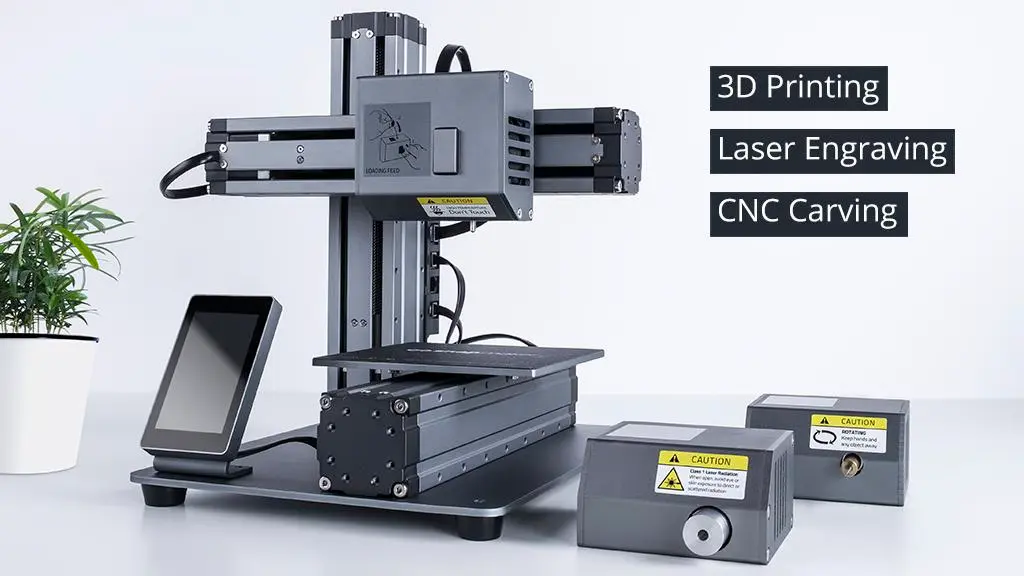
Hourly Operating Costs for 3D Printing, Laser, and CNC
A precise Snapmaker Cost Calculator differs from standard 3D printing tools because of its modular versatility. Each function has a distinct power draw and wear-and-tear profile. Here is the mathematical breakdown:
1. Power Consumption by Module
The power supply draws different loads depending on the active module. For your calculations, use these average values:
- 3D Printing Module: Due to constant bed and nozzle heating, it draws approximately 150W – 300W (higher for the Artisan series).
- Laser Module: The heated bed is off, but the laser head and cooling fans are active. Average consumption is 50W – 100W. If using a fume extractor (Air Purifier), add an extra 150W.
- CNC Module: Depending on the spindle motor load, it consumes between 100W – 250W.
2. Laser Module and “Diode Lifespan”
Laser modules (especially the 10W, 20W, or 40W models) are not infinite. A diode typically has a lifespan of about 10,000 hours.
- The Formula: Module Price / 10,000 Hours = Hourly Laser Depreciation Fee.
- Example: If your 40W module cost $600, you should add $0.06 to your costs for every hour the laser is firing.
3. CNC Bits and Spoilboard Wear
In CNC mode, the primary cost factors are the cutting bits.
- Bit Lifespan: A quality bit lasts between 20 and 50 hours, depending on the material (hardwood vs. softwood).
- Spoilboard: The protective board under the workpiece deforms over time. It is professional practice to include a small “board replacement fee” per project in your Snapmaker Cost Calculator.
4. Maintenance and Linear Module Care
The Snapmaker relies on high-precision linear modules that require regular cleaning and lubrication. Adding a symbolic amount (e.g., $0.05 per hour) for maintenance kits and lubricants ensures the long-term accuracy of your hardware.

Material Management and Waste Control Strategies
A professional Snapmaker Cost Calculator must account for more than just 3D printing filament. Because the Snapmaker is a hybrid system, material costs vary drastically depending on the module (3D, Laser, or CNC) being used. Here is how to track your material expenses accurately.
1. 3D Printing Materials and Success Rates
The enclosure type of your Snapmaker significantly impacts the success and cost of your prints:
- Standard Filaments (PLA, PETG): These are the most economical and have the lowest failure rates.
- Engineering Plastics (ABS, ASA, Nylon): In closed systems like the Artisan, these print more efficiently. However, you should factor in a “waste buffer” of at least 10% for these materials due to potential warping or bed adhesion issues.
2. Sheet Material for Laser and CNC
Unlike 3D printing, laser and CNC projects usually rely on flat stock (plywood, acrylic, leather, etc.).
- Nesting Optimization: Maximizing the use of a wooden sheet radically reduces unit costs. Your calculator should divide the sheet price by total area and multiply it by the area used for the project.
- Kerf and Material Loss: The laser beam or CNC bit removes material during the cut. This “kerf” must be accounted for both in your pricing and in your design, especially for press-fit parts.
3. Auxiliary Consumables
Often overlooked in a Snapmaker Cost Calculator, these small items add up:
- Finishing Supplies: Sandpaper, oils, or stains used after CNC carving.
- Masking Tape: Essential for laser cutting to prevent smoke stains on wood surfaces.
- Filter Replacement: If you use an Air Purifier, the filters have a limited life. Calculate this as a per-hour cost based on the manufacturer’s suggested replacement interval.
4. Accounting for Failures (The Risk Buffer)
Hybrid projects—such as CNC carving a part followed by laser engraving—increase the risk of failure at the second stage. A professional calculation includes a 5% to 15% “error and trial” margin on total material costs to keep your business sustainable.

Pricing Strategies and Commercial Margins for Snapmaker Projects
Calculating your costs down to the penny is a great start, but the ultimate goal of a Snapmaker cost calculator is to ensure you maintain a sustainable profit margin. Snapmaker users are often more than just “makers”—they are artisans. Therefore, your pricing should reflect more than just the sum of your materials.
1. Value-Added Pricing
The Snapmaker’s greatest strength is its ability to create hybrid projects. For example, taking a CNC-carved wooden clock and adding a custom laser-engraved name transforms it from a “commodity” into a “premium gift.”
- Combined Labor: For projects using multiple modules (e.g., 3D + Laser), include a “setup fee” for module swapping and recalibration in your total price.
2. Module-Based Hourly Rates
It makes sense to set different hourly rates based on the module being used:
- 3D Printing: Since it often runs for long periods unattended, the hourly machine rate can be lower.
- Laser & CNC: These yield faster results but require more expertise and constant supervision. The hourly operating rate for these modules can be positioned 50% to 100% higher than for 3D printing.
3. Pricing Models for Your Business
Choose one of these two paths based on your product type:
- Cost-Plus: Total Costs (Materials + Electricity + Amortization) x 2 or x 3. This is a safe bet for small-scale production.
- Value-Based: Research the market for similar handcrafted items on platforms like Etsy. For custom laser-engraved products, the perceived value is often much higher than the raw manufacturing cost.
4. Software and Design Time
Don’t forget: the time you spend in Snapmaker Luban or CAD/CAM software like Fusion 360 is a cost. Charging a separate “Design Fee” or “Setup Charge” ensures you are paid for your technical skills, regardless of how long the machine actually runs.
Frequently Asked Questions (FAQ) for Snapmaker Users
The hybrid nature of a 3-in-1 system like the Snapmaker makes cost estimation more complex than a standard 3D printer. Here are the answers to the most common questions for your Snapmaker cost calculator:
1. How much does electricity really cost per project?
In most regions, a Snapmaker Artisan or 2.0 (with the heated bed active) consumes about as much power as a modern desktop gaming PC. During laser or CNC modes, the base unit’s consumption drops because the heated bed is off. On average, expect 0.15 to 0.30 kWh per hour of operation.
2. Is it necessary to track laser diode wear?
Yes, absolutely. Laser diodes lose intensity over time. If you don’t include depreciation in your Snapmaker cost calculator, you won’t have the budget ready when the module (which can cost several hundred dollars) eventually needs replacement after its ~10,000-hour lifespan.
3. How do I account for broken CNC bits?
Think of CNC bits as pure consumables. A good rule of thumb is to spread the cost of a bit over 20 hours of cutting time. If a bit breaks prematurely due to a settings error, the “risk buffer” (mentioned in Part 3) should cover that loss.
4. Does the Air Purifier add to the project cost?
From a safety standpoint, it is essential. Financially, it increases the hourly cost due to electricity and filter wear. If you are laser cutting professionally, you should pass this cost to the customer as an “Environmental or Safety Surcharge.”
5. Is Snapmaker Luban software free to use commercially?
Yes, Snapmaker Luban is free. However, if you use professional design software like Adobe Illustrator or Fusion 360, those monthly subscription fees should be factored into your general business overhead in your Snapmaker cost calculator.